
What is CareUEyes, and how does it work?
Are you tired of the pain and fatigue that your eyes experience from staring at a screen for too long? CareUEyes is a program developed to safeguard your eyes and mitigate the negative consequences of extended computer usage. CareUEyes provides several tools for reducing eye fatigue and improving visual comfort for those who spend long hours in front of a computer, whether they work in an office or are students, programmers, or gamers. This article describes what CareUEyes is and how it works to protect your eyesight by doing things like altering the color temperature of your screen.
What Exactly Is CareUEyes Software?
Due to blue light disrupting melatonin release, digital visual fatigue (characterized by symptoms like dry eyes, exhaustion, discomfort, etc.) is a common complaint among gamers who spend long hours in front of a computer screen. The circadian cycle is easily disrupted by abnormalities, which might make it hard to get to sleep.
Screen brightness is a critical setting that has a direct impact on the quality of the gaming experience. Screens that are too dim prohibit players from seeing the action properly, while screens that are too bright cause headaches and eye strain. Unfortunately, the brightness of many computer screens is either fixed or difficult to change.
Your response time in games will decrease when your eyes tire, and you won’t be able to notice threats as well. CareUEyes is an application tailored to regular PC users. It’s eye care software, complete with a blue light filter, brightness adjustment, break reminder, focus, and more, so your eyes are protected from every angle while you play and your adversaries are easier to see.
How Does CareUEyes Work?
Filter for the blue light on laptops CareUEyes offers protection for the eyes. This application is a welcome break for people who strain their eyes by looking at a computer screen for long stretches at a time. By reducing the amount of blue light that is emitted from your computer screen, this eye care software may help reduce the amount of strain that you experience in your eyes.
It is possible to manually activate the blue light filter by modifying the display’s color temperature and level of brightness. In addition, with just one click, you may have your screen filtered using one of eight distinct predefined options, each of which corresponds to a certain activity.
Benefits of CareUEyes Software
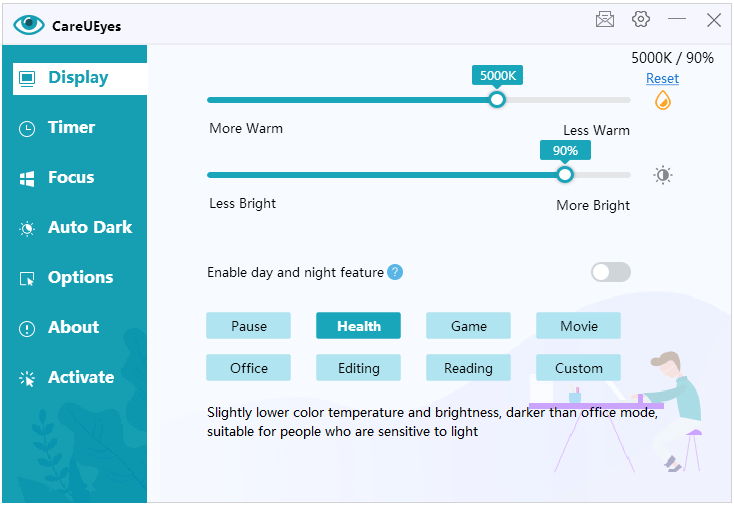
- Blue Light Filter
CareUEyes’ blue light filter is a great feature. During the day, the software adjusts the screen’s color temperature to produce less blue light. This lessens the strain on the eyes and the damage caused by blue light. A number of visual problems, including digital eye strain and disturbed sleep cycles, have been linked to prolonged exposure to blue light. CareUEyes improves the viewing experience and protects eye health by decreasing harmful blue light.
- Screen Dimmer
Users may adjust the brightness of their screens even farther than the default settings allow with the screen dimmer option in CareUEyes. This is a very helpful addition for nighttime or low-light work. The reduced brightness helps avoid eye strain, lowers the visual contrast between the screen and its surroundings, and makes for more pleasant viewing.
- Rest Reminders
Long periods of time spent in front of a computer screen have been linked to headaches, dry eyes, and muscle pain. CareUEyes’s rest reminders are a useful tool for combating these problems. Users have the ability to choose their own preferences for the length of work and rest periods. An on-screen alert appears at predetermined intervals to urge the user to take a break. This is meant as a gentle reminder to take breaks from staring at a screen every once in a while and give the eyes a rest. Taking frequent pauses has been shown to increase blood flow, lessen eye strain, and protect against RSIs.
- Eye Exercises
CareUEyes incorporates a selection of eye workouts that users may undertake in their downtime in order to better maintain eye health. These stretches and exercises can help you focus better and lessen eye strain. Users are led through the drills by both textual instructions and visual cues provided by the program. Blinking, rolling your eyes, and concentrating on faraway things are all examples of eye workouts. Users may relieve eye strain, develop their eye muscles, and keep their eyes healthy by including these activities in frequent breaks.
- Intensity Control
The program includes a blue light filter and screen dimming options that may be customized by the user. Users may experiment with various options to achieve the best combination of comfort and aesthetic appeal. Adjusting these features allows users to build a custom viewing environment that is easy on the eyes.
- Vision Protection Modes
Default, reading, programming, and entertainment are just some of the vision protection modes available in CareUEyes. The screen’s brightness, color temperature, and other visual characteristics are customized for each mode. Contrast and color temperature may be adjusted for reading mode, while brightness can be decreased for programming. These modes are an attempt to ease visual fatigue by tailoring the screen’s settings to various tasks. Users may easily choose between various settings to enhance their viewing experience while reducing the strain on their eyes.
- Evening/Night Mode
CareUEyes modifies the display’s color temperature at night to make it easier on the eyes. This reduces the potential for blue light to affect sleep habits. Melatonin, a hormone that controls sleep and wakefulness, can be disrupted by exposure to blue light in the hours before bedtime. CareUEyes improves sleep quality and promotes healthy sleep patterns by decreasing blue light output during evening and nighttime computer use.
- User-Friendly Interface
The program has a simple and straightforward interface. The user-friendly interface makes it simple to change settings like the blue light filter, screen brightness, and break reminders. The user-friendly design makes it simple to set individual settings and get the most out of the eye care service.
- Flexibility and Compatibility
CareUEyes works on a number of different platforms, including Windows and macOS. This makes sure that the software’s eye care capabilities are accessible to users across all operating systems. Users with varying levels of technical expertise will be able to successfully install and set up the program.
- Centralized Management
CareUEyes’ business model offers consolidated administration for enterprises. Organizational administrators have the ability to manage and alter the settings of many devices to ensure that all employees receive the same high standard of eye care. This function facilitates streamlined administration and quick rollout of eye care policy.
- Usage Analytics and Reporting
Features, like use metrics and reports, may be included in CareUEyes’ business package. By keeping tabs on workers’ eye health, businesses may learn useful information about things like how often workers use computers, whether or not they take breaks, and how often they perform eye exercises. Using this information, businesses may better assess needs, create tailored training and awareness initiatives, and preventatively address employee concerns about their eyesight.

Plans of CareUEyes Software
CareUEyes provides a variety of pricing tiers to meet the requirements of a wide range of customers. The features and capabilities of each plan vary. CareUEyes’s several packages and their specifics are outlined below.
- Free Plan
CareUEyes provides its consumers with a free plan that includes some rudimentary eye care services. The fundamental features, such as the blue light filter and screen dimmer, are included in the free plan. Users may make use of these functions to lessen the strain on their eyes and fine-tune the brightness of their screens.
- Pro Plan
The Pro version, $2.9 per month, of CareUEyes has access to premium settings and tools. The Pro subscription tier may also unlock additional eye workouts, giving subscribers more options for relieving stress and building power in their eye muscles. All of the capabilities found in the free tier are included in the paid Pro tier, plus additional features.
- Business Plan
Businesses may make use of CareUEyes’s specialized business strategy. A business plan, 14.9$ per year, is a centralized management, which gives IT staff granular control over the preferences of all company-issued devices. It might provide analytics and data on employee use, allowing businesses to keep tabs on their workers’ eye health.
- Students Plan
Students and educators plan are eligible for up to 50% off CareUEyes Premium. You must have a school-specific email address provided by the school (e.g. xxx.edu) that can receive external email, please use your school email to contact education-marketing@care-eyes.com
- Lifetime License
If you’d rather pay once and use CareUEyes forever than subscribe, you can get a Lifetime License. With a lifetime license for $39.99, customers do not have to worry about making monthly payments and may enjoy the Pro plan forever. Users who aren’t interested in committing to a subscription but still want access to CareUEyes’ premium features can do so by purchasing this option.
Conclusion
In order to maintain good health, relaxation is crucial. Although we’re all aware that we should take regular breaks from our PC work, we often fail to do so since we’re too focused on the task at hand. You may protect your eyes by taking short breaks every few minutes. Care for your eyes by installing CareUEyes on your computer.

 Start Your Online Jobs
Leave a comment