

In today’s digital world, typing efficiently is an essential skill. Whether you’re writing emails, coding, or simply chatting online, your typing speed and accuracy can greatly impact productivity. If you’re looking to enhance your skills effortlessly, Keybr.com is the perfect tool to guide you on the path to faster, smarter typing.
Why Touch Typing Matters
Touch typing is the ability to type without looking at the keyboard, relying on muscle memory instead of sight. This method allows for greater speed, accuracy, and efficiency, ultimately boosting productivity. Traditional typing methods involve excessive glancing at the keyboard, which slows down workflow and increases errors. Mastering touch typing means fewer mistakes, faster responses, and a more fluid typing experience.
How Keybr Enhances Your Typing Skills
Keybr.com stands out as a dynamic and intuitive typing tutor that adapts to your skill level. Unlike static typing courses, Keybr.com uses advanced algorithms to analyze your typing patterns and generate customized lessons tailored to your weaknesses. Here’s what makes it effective:
1. Personalized Learning Experience
Keybr.com identifies the letters and key combinations you struggle with and adjusts lessons accordingly. This targeted approach ensures that your practice time is spent efficiently. Here’s how it works:
- Adaptive Lessons: The platform tracks your errors and tailors exercises to reinforce weaker keys.
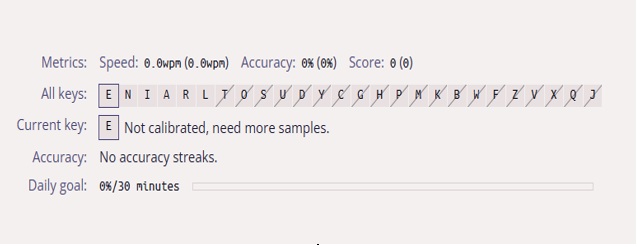
- Real-Time Progress Tracking: A control panel displays your typing speed, accuracy, and improvement trends
- Touch Typing Focus: Keybr.com encourages touch typing by gradually introducing new letters based on your skill level.
2. Real-Time Feedback & Analytics
The platform provides instant feedback on your typing speed, accuracy, and areas for improvement. Progress charts and detailed analytics help you track improvement over time. Here’s how it works:
- Instant Error Detection: The platform highlights mistakes as you type, allowing immediate correction.
- Speed and Accuracy Metrics: This section displays the words per minute (WPM) and accuracy percentage to help monitor improvement.
- Adaptive Learning: Adjusts lessons based on your typing patterns, focusing on weaker keys.
3. Gamified & Engaging
Learning is fun with Keybr! Features like leaderboards, multiplayer typing races, and achievement tracking make practice enjoyable. Competing with others can further motivate you to improve.

If you’re looking for more typing games, Typing Bird is a fantastic option.
Typing Bird is a free online platform that offers interactive typing games to help kids improve their speed and accuracy. It features over 50 lessons for all skill levels, over 16 arcade-style games, no registration required, and is completely free. The platform supports English typing and is compatible with desktops, tablets, and mobile devices. Typing Bird is beginner-friendly, suitable for all ages, and compatible with all keyboards.

4. Adaptive Lessons
Instead of repetitive drills, Keybr.com dynamically generates lessons based on your typing history, ensuring you focus on the letters you struggle with the most. Here’s how it works:
- Personalized Learning: Keybr.com analyzes your typing patterns and adapts lessons to reinforce weaker keys.
- Progress Tracking:
1. Accuracy & Speed Metrics: It records your words per minute (WPM) and error rate, helping you identify areas for improvement.
2. Visual Progress Reports: Keybr.com provides charts and graphs to show your typing speed trends and accuracy improvements.
- Touch Typing Training: Gradually introduces new letters based on your skill level, encouraging proper finger placement.
Customization Options
Keybr.com offers several customization options to tailor your typing practice to your preferences:
- Language Selection: You can choose from different languages to practice typing in your preferred one.
- Text Length Adjustment: Modify the length of the text you type to suit your comfort level.
- Difficulty Level: Increase or decrease the difficulty based on your typing proficiency.

Keyboard Layouts
Keybr.com supports multiple layouts, including QWERTY, Dvorak, and Colemak. You can select your preferred layout in the settings, and the lessons will adapt accordingly. The platform also tracks your progress and offers statistics about your typing efficiency.
how to unlock all keys in keybr.com
To unlock all keys in Keybr.com, you need to improve your accuracy and confidence level with the keys you are currently practicing.
- Focus on Accuracy: Keybr adds new keys based on how well you type the existing ones. Prioritize hitting the correct keys rather than speed.
- Use Settings: You can manually add letters to your lessons by going to ⚙️ Settings > Lessons > Add letters to words.
- Consistent Practice: As you type more accurately, new keys will appear more quickly. Some users have unlocked all keys within a couple of days by focusing on precision.
- Confidence Level: Keybr tracks your confidence with each key. If you struggle with a particular letter, the system will slow down and focus on improving that key before adding new ones.
Typing Test
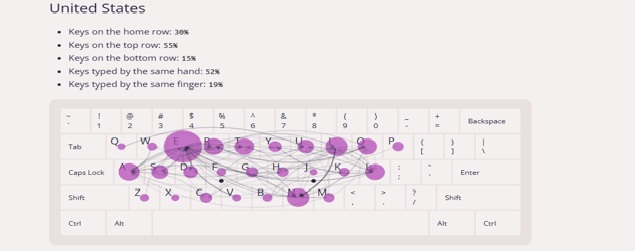
Keybr.com is not just a typing test—it tracks every key press and computes statistics for each individual keyboard key. Here are the types of tests and tracking features it offers:
- Adaptive Typing Tests: Keybr.com automatically generates lessons focusing on your weakest keys, ensuring targeted improvement.
- Speed & Accuracy Tracking: It allows you to set your target typing speed and monitors your progress toward this goal.
- Progress-Based Challenges: The platform starts with a small list of the most frequent letters in your language and gradually expands as you improve.
Unlike traditional typing tests, Keybr.com customizes your experience based on your performance, making it an effective tool for mastering touch typing.

What other typing tools can you use to improve your accuracy and speed?
- Typesy: Offers over 5,000 lessons, interactive games, and cloud syncing for seamless practice across devices. It has both free and paid options, with premium features available in the paid version.
- TypingMaster: Provides detailed analysis of your typing habits and personalized training to boost efficiency. It provides a free version that includes lessons and practice tests.
- Typing.com: A free tool with engaging exercises, progress tracking, and lessons tailored for beginners.
- TypingClub: Features fun challenges and structured lessons to help users master touch typing. The tool is free for individuals and schools, but there is also an optional paid school edition available.
- KAZ Type: Uses a unique teaching method to retrain fingers and eliminate bad typing habits. It offers free online typing practice but requires payment for full courses.
Each of these tools has its strengths, so you might want to explore them to see which fits your learning style best!
Getting Started with Keybr.com
Starting is simple! Visit Keybr.com, sign up for an account, and begin practicing. By dedicating a few minutes daily to touch-typing exercises, you’ll see significant improvements in both speed and accuracy.
Keybr Premium account
Upgrade to a premium account price: S$12.88 for additional features and an ad-free browsing experience. Below are the benefits of having a premium account:
- Ad-Free Experience: Removes all ads, ensuring a distraction-free learning environment.
- No Trackers: Eliminates tracking tools for improved online privacy.
- Faster Loading Times: Without ads, pages load more quickly, making the platform more responsive.
- Lifetime Access: A single payment grants unlimited access to premium features. It is a one-time payment that provides lifetime access. It is NOT a recurring subscription.
Conclusion
Mastering touch typing is a valuable skill that can enhance your efficiency, productivity, and confidence in digital communication. With Keybr.com’s adaptive learning approach, real-time tracking, and engaging features, strengthening your typing skills has never been easier or more enjoyable.
So, are you ready to type smarter, not harder? Let Keybr.com guide you toward a more efficient typing experience!
 Start Your Online Jobs
Leave a comment