

Ever had a brilliant idea for a video game? A flash of inspiration for a world you’d love to explore, a character you need to bring to life, or a story that just has to be told?
For many of us, the dream often ends there. When you think about programming, 3D modeling, and asset pipelines, the task seems overwhelming.
What if you could build a game not with lines of C++ or Python, but with vibes? What if you could describe the world, the mood, and the gameplay like you were telling a friend about a dream?
Welcome to the future of game creation. Welcome to Rosebud AI, where you don’t write code—you write “Vibe Code.”
What is Rosebud AI, and what is “Vibe Code”?
Rosebud AI is a groundbreaking platform that uses generative AI to turn your text prompts into playable games and interactive experiences. It’s designed for storytellers, artists, and dreamers, not just seasoned developers.
The magic behind it is what we’re calling “Vibe Code.”
Vibe Code is the art of using natural language—descriptive words, moods, and scenarios—to instruct an AI. Instead of typing function player. Jump (height: 10), you type:
“Make the character a nimble astronaut who can do a floaty, low-gravity jump.”
Instead of meticulously placing assets, you describe the scene:
“Create a cozy, rainy-day cafe where you serve coffee to sad ghosts. The art style is Ghibli-inspired, with warm lighting and steam on the windows.”
Your idea, your feeling, and your vibe become the source code. The AI interprets this Vibe Code to generate characters, environments, assets, and even game logic. It’s a conversation, not a command line.
Your First Rosebud AI Game: A Step-by-Step Guide for Quick Setup
Are you prepared to take on the role of a Vibe Coder? Let’s build your first game. It’s faster and more fun than you can imagine.
- Step 1: Head to the Studio and Dream Up Your Vibe
First, navigate to the Rosebud AI website and log in to your account. A simple prompt box will greet you. This box is where the magic begins.
This space is your canvas. Don’t be shy. Think about the core of your game idea. What is the genre? What is the art style? What does the player do?
Let’s start with a fun, descriptive prompt.
Example Vibe Code Prompt:
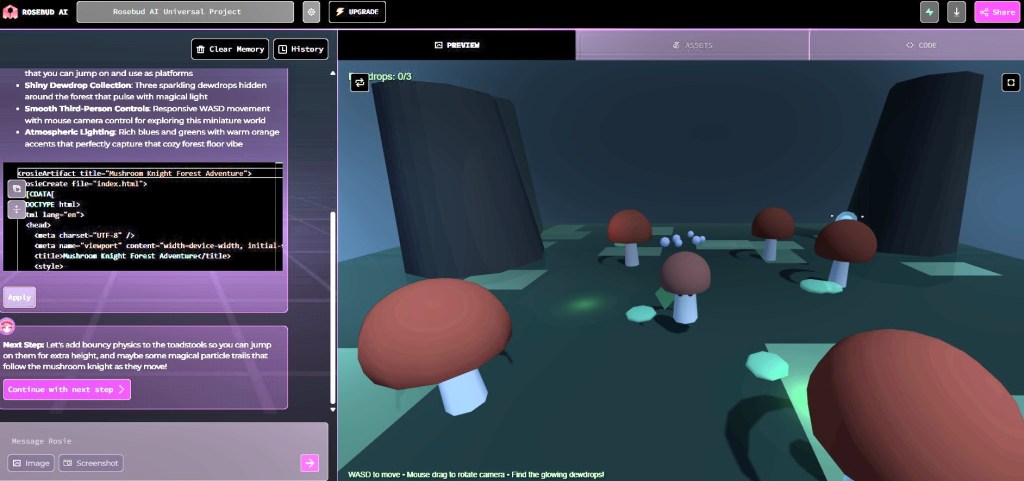
“A 3D third-person platformer game. The player is a charming, little mushroom knight with a leaf for a shield. The world is a magical, oversized forest floor with glowing moss and giant, bouncy toadstools. The goal is to collect three shiny dewdrops.”
- Step 2: Generate Your World
Press “Generate” to let Rosebud perform its magic. The AI will parse your Vibe Code and begin building the scene. It will generate
The character: A mushroom knight, just as you described.
The Environment: A lush forest floor, complete with the assets you mentioned.
The Goal: It will likely place the collectible “dewdrops” around the level.
Basic Logic: They will understand this is a platformer and give your character basic movement controls.
In a minute or two, you will have a playable, interactive skeleton of your game.
- Step 3: Refine and Iterate with Conversational Commands
This is where you truly become a game director. Your first generation is a starting point, not the final product. Now you can “talk” to your game to change it.
Click on an object or just type in the chat box. Treat the AI like a creative partner.
Want to change the character?
“Change the mushroom knight’s cap to be red with white spots.”
Want to alter the environment?
“Make the sky a perpetual twilight purple and add a second moon.”
Need more interactivity?
“When the player touches a bouncy toadstool, they should launch high into the air.”
Want to add an NPC (non-player character)?
“Add a wise old owl NPC sitting on a branch. When the player gets close, he should say, ‘The dewdrops shimmer brightest in the darkest corners!”
This continual back-and-forth is the core of Vibe Coding. You see something, you have a new idea, you describe it, and the AI makes it happen.
- Step 4: Add Logic and Win/Loss Conditions
A game needs rules. You can add them with a simple Vibe code, too.
Winning:
“Once the player collects all three dewdrops, display a ‘You Win!’ message and play a victory sound.”
Losing (optional):
“Add some grumpy slug enemies that patrol the ground. If they touch the player, reset the level.”
- Step 5: Play and Share!
At any point, you can click the “Play” button to test your creation. Run around, jump on the toadstools, and see how it feels. When you’re pleased with your mini-game, you can generate a shareable link to send to your friends.
Just like that, you’ve gone from a simple idea to a playable, shareable game. You didn’t write a single line of traditional code, but you directed every creative decision.
If you’re interested in learning more about Rosebud AI, check out their official YouTube channel for more tutorials.


An example of a game created by MystyDev using RosebudAI.
This video, “AI made me a HORROR game in 1 day!,” demonstrates how Rosebud AI can be used to create video games from simple text prompts. The creator first shows how to generate a basic paper plane flying game by describing the desired gameplay. They then showcase the process of refining the game by adding new features like improved controls, a boost mechanic, and updated visuals, all through conversational commands with the AI.
The video further explores Rosebud AI’s capabilities by creating a more complex horror shooter game, detailing the step-by-step process of implementing a character controller, weapon systems, a randomly generated map, and enemy AI. The creator highlights the AI’s ability to generate 3D models and textures from text and even debug issues based on screenshots and descriptions, ultimately building a complete game within a single day.
Tips for Effective “Vibe Coding”
Be Specific with Adjectives: Don’t just say “a forest.” Say “a spooky, fog-filled forest with gnarled, leafless trees.”
Think in Layers: Start with the big picture (environment, mood), then add characters, then add interactive objects, and finally, add game rules.
Use References: Mentioning styles like “pixel art,” “Ghibli-inspired,” or “cyberpunk” gives the AI a powerful creative shortcut.
Experiment! The best part about Rosebud is the low cost of trying something new. Don’t like the result? Just change the prompt. Ask, “What if…?” and see what happens!
The limit to creating games is no longer technical skill but rather your imagination. Rosebud AI and the concept of “Vibe Code” empower anyone to be a creator.
You can explore a vast array of prompts to expand your creative abilities. Here are some fresh directions you could take:
World-Building Prompts
- Imagine a bunch of islands floating in the sky, each one humming with a different feeling – joy, sadness, anger, you name it. As a player, you’d need to fix things by figuring out puzzles that are all about those emotions. Cool, right?
- Alternatively, consider a city where plants have completely taken over after the world ended. You’d be a little robot botanist, trying to figure out all the new plants that have sprung up. What secrets do they hold?
Gameplay Mechanics
- What if you were a shadow in a game? You could only move in the dark, so stealth would be your superpower!
- Now, picture a platformer game, but the whole world moves to the beat of chill lo-fi music. Jump, duck, and slide in time with the rhythm!
Art Style Experiments
- Let’s get retro! Imagine a game with that bouncy, rubber-hose animation style from the 1930s cartoons. Throw in some grainy film effects for extra vintage charm.
- Or how about a pixel art detective story set in a dark, rainy city with neon lights flickering everywhere? This is a modern take on classic noir!
Narrative-Driven Concepts
- Think about a visual novel where you play as a ghost. You get to experience your last day on Earth through the memories of the people you knew. Heavy stuff!
- What if your choices changed the past instead of the future? That’s the idea behind this RPG. How would you rewrite history?
Whimsical & Cozy Vibes
- This idea is adorable: you are a raccoon who operates a small café in the forest for all the woodland creatures! Imagine the cozy crafting possibilities!
- Picture yourself as a cloud, drifting around and changing the weather. You could influence how people feel in different towns. Aww!
Rosebud’s got even more examples on their blog, like a cyberpunk pretzel delivery game called “Robo-stache Pretzels” and a spaceship adventure across endless deserts called “Desert Dunes Explorers.” Maybe those will spark something new!


Rosebud AI’s Pro features
These powerful toolkits are for game creators and storytellers who want to go beyond the basics. Here’s what you get with the Pro plan:
- Advanced AI NPCs: Create emotionally responsive, deeply customizable non-player characters that evolve with your story.
- Visual Novel & RPG Makers: Access specialized tools for building branching narratives, cozy games, and complex RPGs—no coding required.
- Sprite Sheet Generator: Automatically generate animated sprite sheets for your characters and scenes.
- AI Skyboxes & PixelVibe: Design immersive environments and game assets using AI-generated skyboxes and pixel art tools.
- Tokkingheads Animation: Animate characters using text, audio, or video inputs—perfect for trailers or in-game cutscenes.
- Faster Game Prototyping: Convert plain text into game logic and environments instantly, speeding up your creative process.
If you’re looking to access pro features without spending money, here are two ways to do so.
- Affiliate Program: If you’re a content creator or streamer, you can join their affiliate program and earn commissions while getting free access.
- Creative Sponsorship: Share your cool projects with the Rosebud team. If selected, you’ll receive a free Pro plan as part of their sponsorship initiative.
You can explore these options on Rosebud AI’s free subscription page
Glossary for Beginners
- Vibe Code: Natural language is used to describe a game’s elements and mood, instead of code. Example: “A pixel art café run by friendly raccoons.”
- NPC (Non-Player Character): Characters not controlled by the player. In Rosebud, they can be customized with AI behavior.
- Skybox: The distant background in a 3D game is often used to create immersive environments (e.g., night sky, space).
- Sprite Sheet: A sprite sheet is a grid that displays 2D animation frames for a character or object. Rosebud generates these automatically.
- Game Logic: The game logic encompasses the rules and mechanics that drive gameplay, such as movement, win/loss conditions, and interaction triggers.
- PixelVibe: Rosebud’s tool utilizes AI to generate pixel art. This tool is particularly useful for creating retro-style games.
- Tokkingheads Animation: This feature animates characters using input text, audio, or video, making it ideal for cutscenes and trailers.
- Branching Narrative: A narrative structure, prevalent in visual novels and RPGs, allows player choices to lead to various outcomes or paths.
Conclusion: The Future of Game Creation Is Here—and It Speaks Your Language
With Rosebud AI and the magic of Vibe Code, we’re entering a new era where the barriers to game development no longer lie in technical skills but in how boldly you can imagine. Whether you’re a writer, an artist, a daydreamer, or all three, your words are your code, your story is your engine, and your vibe is your blueprint. You don’t need to learn Unity or Blender—you just need to feel, describe, and play.

 Start Your Online Jobs
Leave a comment